


TrueLane by the Hartford
4.01.63K Reviews
App Specs
- Version
- thehartford-v3.0.0.0-94839-g4d9860c-prod
- Updated On
- License
- Free
- Downloads
- 100,000+
- Developer
- The Hartford Insurance Group, Inc.
- Categories
- Maps & Navigation
- Platform
- Android
Screenshots
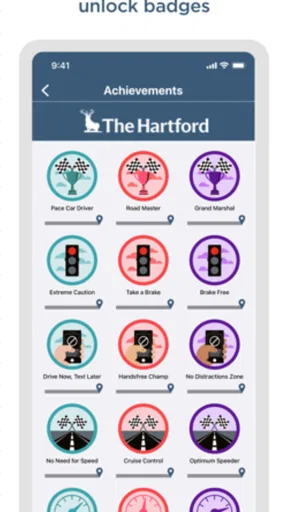
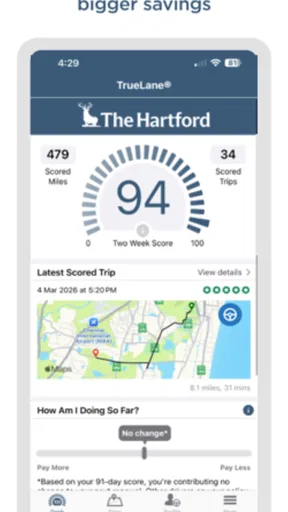
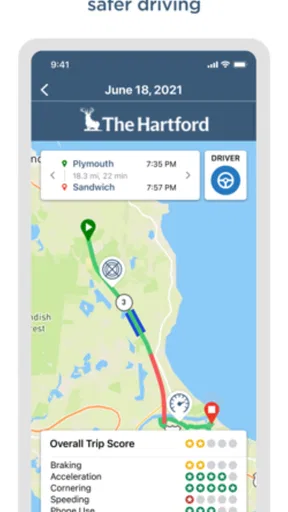
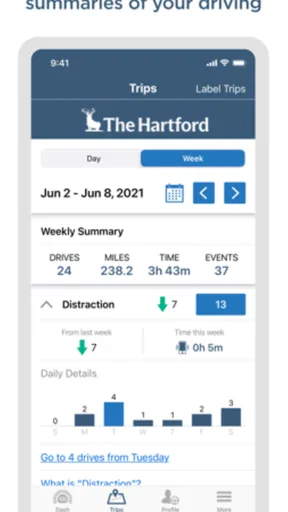
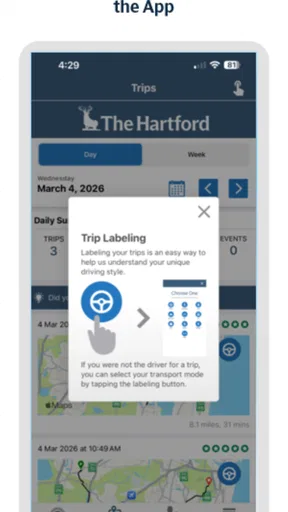
 Analysis by AppCompare
For a first-time driver, TrueLane by The Hartford is best understood as a driving-focused companion rather than a replacement for a traditional navigation app. It belongs to the Maps & Navigation category, but its purpose is tied to telematics and the way a journey is recorded and reviewed. I found that distinction important from the beginning: if you are looking for turn-by-turn directions, live traffic, or a broad map of nearby places, this is not the tool I would open first. If you want a more deliberate way to engage with a driving program connected to The Hartford, its narrower focus makes more sense.
The app is free, carries an Everyone age rating, and comes from The Hartford Insurance Group, Inc. Its public reception is solid rather than overwhelming, with a 4.0 average from around 2.5 thousand ratings and more than 100 thousand installs. Those figures suggest a real, established user base, while also reminding me that this is a specialized insurance-related app, not a general-purpose navigation service used by almost everyone.
Getting from installation to a useful first drive
I’d begin by treating setup as part of the first drive, not as a chore to rush through on the way out the door. Before heading off, I’d check that the app is ready and decide where the phone can stay secure and undisturbed for the whole trip. That small bit of planning makes it easier to tell whether any later confusion came from setup or from the journey itself.
What to expect before you begin
The most useful mindset is to treat TrueLane as part of a process. Installing it is only the opening step; the meaningful result comes after the app is set up correctly and has enough driving activity to work with. That means a quick glance at the interface may not tell you much. The value is likely to appear when you use it consistently and return to review what the app has captured or presented.
I would not install it immediately before an important trip and expect it to behave like a map app. A better plan is to set it up at home, when you are not in a hurry, then take a normal drive and check the app afterward. This simple change avoids the most common mistake with telematics tools: trying to configure them while already sitting in traffic or preparing to leave.
The current version is identified as thehartford-v3.0.0.0-94839-g4d9860c-prod, and it requires Android 10 or later. In practical terms, that makes checking your phone’s operating system worthwhile before you spend time looking for the app. Compatibility is easy to overlook because many navigation apps support older devices, while a newer telematics app may expect a more recent software environment.
I also recommend deciding what you want from the app before the first drive. Some people want reassurance that their driving activity is being handled correctly. Others want to understand how their driving habits fit into an insurance-related program. Those are different expectations from wanting a route planner, and knowing which one applies will make the first session much less confusing.
Worth Reading Before You Choose

EA SPORTS FC Mobile 26 Is a Bigger Football Game, but It Takes Time

Flipboard Shows What News Apps Must Do Beyond the Feed

Switching to Android Auto Means Rethinking Your Driving Routine

Google Calendar Makes a Crowded Week Easier to Manage

Ludo King Makes the Most of the Minutes Between Plans

Baby Panda World Brings Quick Play to Modern Phones, but Its Game Library Feels Busy
Setting it up without rushing
My preferred setup routine is straightforward. Install the app, open it while parked, read each screen instead of tapping through automatically, and make sure the account or program details shown in the app match what you expect. If the app asks you to complete a step connected with your Hartford coverage or participation, I would finish that before starting a drive rather than assuming it can be handled later.
Pay particular attention to any screen that explains how a trip is recognized or reviewed. Telematics applications depend on context: the phone needs to know that a journey is taking place, and the app needs a reliable way to associate activity with the correct user or vehicle. I would not guess when a setup choice affects that relationship. If something looks unclear, stopping there is safer than creating a record that you later need to untangle.
A useful preparation habit is to place the phone in its normal, secure position before driving. I would avoid holding it, moving it between seats, or changing its location halfway through a trip. Even without treating the phone as a navigation screen, stable placement makes the overall workflow more predictable and keeps the driver from interacting with it on the road.
Another practical tip is to finish setup on a reliable connection and then reopen the app before leaving. That gives you a chance to notice whether the account is ready, whether a required step remains, and whether the main screen looks different from the first launch. It is a small check, but it can prevent a frustrating drive followed by the discovery that the app was never ready to record anything useful.
The first successful action
For me, the first meaningful success is not simply seeing the home screen. It is completing a normal drive and then finding a clear result afterward. I would choose a familiar journey, such as a trip to work, a grocery store, or a relative’s home. A familiar route is better than an unfamiliar one because you can concentrate on driving and judge whether the app handled the trip without adding another task.
Before starting, I would open TrueLane only while parked and confirm that the setup appears complete. Then I would put the phone away and drive normally. The important part is resisting the urge to check progress during the trip. A telematics app should fit around safe driving, not encourage the driver to monitor a score or status while moving.
After parking, I would return to the app and look for the journey’s result. This is where a first-time user can learn how the product communicates: perhaps through a trip record, a summary, or another form of feedback within the program. I would take a few minutes to understand what the screen is showing before drawing conclusions from a single trip.
That last point matters. One unusual journey can contain conditions that do not represent your everyday driving. A short errand, a sudden detour, a crowded parking area, or a route with frequent stops may look different from a regular commute. I would use the first result to confirm that the workflow works, not to make a major judgment about my driving or insurance situation.
The most reassuring first-session routine is therefore simple:
- Complete setup while parked.
- Use a familiar route without touching the phone.
- Open the app only after arriving safely.
- Review the trip calmly and note how the app labels or summarizes it.
This approach gives you a concrete win without turning the first drive into a technical experiment. It also makes it easier to tell the difference between a setup problem and a result that simply reflects an unusual trip.
Confusion that can happen on the first day
The biggest source of confusion is the app’s category. Seeing “Maps & Navigation” may lead you to expect a conventional map, but TrueLane’s identity is telematics. I would not compare its opening experience directly with Google Maps, Apple Maps, or Waze, because those products are built around finding places and guiding you along routes. TrueLane serves a more specific driving and insurance-related purpose.
Another point that can surprise new users is that the app may feel quiet between drives. A navigation app gives you something to do immediately: search for a destination and start guidance. A telematics app becomes more useful through repeated, ordinary use. If the first launch seems sparse, that does not automatically mean it is broken. The better test is whether it is ready for a drive and whether it presents a usable result afterward.
I would also avoid treating every displayed result as a final verdict. Driving records and summaries need context, especially when you are still learning how the app works. If an entry looks unexpected, first check whether the journey was recognized correctly and whether you may have opened the app before the trip had fully finished processing. Rushing to interpret one item can create unnecessary concern.
Privacy and attention are practical considerations too. Anyone uncomfortable with an app connected to driving activity should think carefully before enrolling or continuing. This is not a criticism of TrueLane specifically; it is a consequence of choosing a telematics service. You are using it because driving information matters to the program, so I would only recommend it to someone comfortable with that basic exchange and willing to read the relevant in-app explanations.
There is also a difference between technical convenience and driving convenience. Even if the app is easy to operate, it should not become another dashboard distraction. I would silence the impulse to inspect it at traffic lights, avoid mounting it where it blocks your view, and handle all reviews after parking. For this type of app, safe habits are part of getting a reliable experience.
How it compares with ordinary navigation choices
When I need directions, I would still choose a mainstream navigation app. Those tools are better for route planning, traffic changes, destination search, public places, and visual guidance. They are designed to answer “How do I get there?” quickly. TrueLane is a better fit when the question is closer to “How is my driving activity being captured or reviewed within this Hartford-related program?”
That makes the comparison less about which app is superior and more about which job needs doing. A driver can reasonably use a navigation app for directions and TrueLane for its separate telematics role. Trying to make one replace the other would be frustrating. The trade-off is that TrueLane’s narrower purpose may feel limited, but that same narrowness can be useful when you do not want an insurance-related driving tool overloaded with unrelated map features.
I would also distinguish it from a generic mileage tracker. A simple mileage app may be enough if your only goal is keeping a personal log of journeys. TrueLane makes more sense when your driving activity is relevant to The Hartford’s program and you want to use the app in that specific context. If you are not interested in that relationship, a personal tracker or no app at all may be the cleaner choice.
The same reasoning applies to people who want detailed vehicle diagnostics, emergency assistance, or a broad dashboard of car information. I would not choose TrueLane as a universal car-management tool. Its strength is being focused, not being a one-app solution for every driving need.
Small habits that improve the experience
The first useful habit is consistency. If you decide to use the app, use it as part of your normal driving routine rather than opening it only when you remember. Regular use gives you a more coherent picture than isolated tests, and it reduces the temptation to interpret one unusual trip too seriously.
The second is to review after parking, not during the journey. This sounds obvious, but telematics feedback can make people curious about what is happening in real time. I found the better workflow is to let the drive happen naturally and inspect the result later. That protects attention and gives the app a fairer chance to process the trip without interference.
The third is to keep your setup stable. Use the same secure phone position whenever possible, avoid changing devices casually, and check the app after a phone update or major settings change. These steps do not make the app more powerful, but they make unexpected results easier to diagnose because fewer variables are changing at once.
A fourth insight is to separate troubleshooting from interpretation. If a trip does not appear as expected, first ask whether the app was ready, whether the phone was available in its usual position, and whether the session had time to update. Only after those basic checks would I consider what the result says about the journey itself. This prevents a technical hiccup from becoming a mistaken judgment about your driving.
Finally, use the app as a feedback tool, not as a reason to drive unnaturally. The best result should come from ordinary, attentive driving. Braking late, accelerating harshly, or changing your behavior just to chase a better-looking record defeats the purpose of a realistic telematics experience and can create risks that are far more important than any app screen.
Who should use it and who should skip it
I would recommend TrueLane to a Hartford customer who has a clear reason to participate in a telematics program, owns a compatible phone, and is comfortable reviewing driving activity after trips. It is particularly suitable for someone who wants a focused companion rather than a crowded automotive dashboard. The free price also makes trying it less of a financial commitment, although the real decision is whether the program’s purpose fits your expectations.
I would skip it if you are searching for live directions, traffic avoidance, local search, or a detailed map. I would also hesitate if you dislike driving-related apps collecting or presenting activity, or if you know you will forget to complete setup and then blame the app when a trip is not useful. In those cases, a conventional navigation tool or a simpler personal tracker may suit you better.
Families and shared-vehicle users should think through their routine before relying on it. If more than one person uses the same car or phone, the important question is whether the app can clearly reflect the intended driver and program arrangement in your situation. I would resolve that point during setup instead of assuming every journey will be interpreted exactly as you expect.
My final take after looking at the whole workflow
TrueLane is a focused Maps & Navigation app with a telematics purpose, developed by The Hartford Insurance Group, Inc. It is free to install, rated for Everyone, and has built enough adoption to show that the concept is useful to a substantial group of drivers. Its current release works on Android 10 and newer devices, so checking compatibility is a sensible first step.
What I like most is the clear division of purpose. It does not need to compete with full navigation apps when its role is connected to driving activity and an insurance program. Once I approached it as a setup-and-review companion rather than a route planner, the path to a first useful result became much clearer.
What limits it is the same specialization. Someone expecting instant map guidance may find it underwhelming, and anyone uneasy about telematics should not install it casually. The app rewards patience, consistent setup, safe driving habits, and a willingness to review information after the fact.
My advice to a new user is to install it before you need it, complete every setup step while parked, take one familiar drive, and inspect the result only after arriving. If that workflow matches what you want from a Hartford-related driving tool, TrueLane is worth trying. If your goal is simply to get from one address to another, I would keep using a dedicated navigation app instead.
Pros
- Helps identify risky driving patterns with clear feedback.
- Can support safer habits through personalized driving insights.
- Useful for Hartford customers seeking potential policy discounts.
- Runs in the background without requiring constant interaction.
- Driving history can make insurance conversations more transparent.
Cons
- Requires consistent phone access and permissions to record trips.
- Battery and mobile data use may increase during frequent driving.
- Results can be affected by poor GPS or phone placement.
- Privacy concerns may arise from sharing location and driving data.
- Not all driving behavior or trips may qualify for savings.
FAQs for TrueLane by the Hartford
What is TrueLane by The Hartford, and how does it work?
TrueLane is a driving-behavior and telematics app from The Hartford that uses your phone’s sensors and location services to evaluate trips. After setup, it can detect driving activity and analyze factors such as braking, acceleration, cornering, phone distraction, and trip timing. The app turns this information into driving feedback and may support insurance-related rewards or savings, depending on your policy, eligibility, and state.
Does TrueLane track my location and driving activity?
Yes. TrueLane generally requires access to location services and other phone permissions so it can identify when you are driving and measure trip-related behavior. The app may collect information such as route data, trip duration, speed-related events, phone handling, and driving patterns. Before enrolling, review the app’s privacy policy, permission settings, and The Hartford’s program terms to understand how data is used, stored, and shared.
Can TrueLane lower my car insurance premium?
TrueLane may provide an opportunity to earn a discount or other insurance benefit by demonstrating safer driving, but savings are not guaranteed. The result can depend on your state, policy, enrollment rules, driving score, trip history, and the terms applicable to your account. The app itself should not be treated as a promise of a specific discount, so confirm the details directly with The Hartford before enrolling.
Will TrueLane work properly if I use my phone while driving or ride as a passenger?
The app is designed to distinguish driving activity from other trips, but no smartphone-based system is perfect in every situation. Passenger rides, public transportation, poor GPS reception, phone placement, Bluetooth connections, and unusual vehicle movement can affect trip detection or scoring. If a trip is incorrectly classified, check the app for available correction options and follow The Hartford’s instructions rather than interacting with the phone while driving.
What should I check before downloading and enrolling in TrueLane?
Before downloading TrueLane, make sure your device meets the current Android or iOS requirements and that you can sign in with eligible The Hartford policy information. You should also review battery usage, mobile-data needs, required permissions, privacy terms, and enrollment deadlines. If other household members drive the insured vehicle, understand how their trips may be handled, because their driving behavior could affect the program’s results or eligibility.


